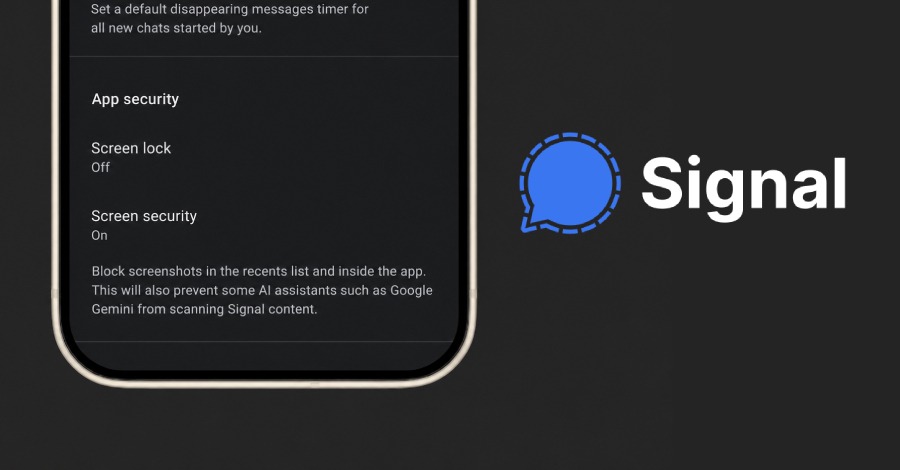
The Hacker News reports that Signal will block screenshots by default to stop AI agents from reading private chats.
Signal has announced that it will restrict screenshots by default to stop artificial intelligence (AI) agents from reading private chats on Android and iOS devices, but conceded that the protection is “incomplete.”
The feature applies to agentic systems built into iOS 27 and on Android versions where the encrypted messaging platform can detect an AI assistant attempting to read the Signal
Source: The Hacker News · Read More

What this means for your business
AI assistants are now built into many phones and computers. Some of them can read what is on the screen in order to help you. That is useful, but it also means sensitive messages could be seen by software you did not expect. Signal itself says the new protection is incomplete. So it is one helpful layer rather than a complete fix.
For businesses, the bigger lesson is about control. You should know which apps and AI tools can see company data on staff devices.
How to manage Signal, AI agents and other assistants at work
- Agree which messaging apps staff may use for work conversations.
- Review AI assistant settings on company phones and laptops.
- Use mobile device management to apply settings across all devices.
- Keep phones and apps updated, so new privacy controls arrive quickly.
- Remind staff not to share passwords or client data in chat apps.
In short, AI tools can save time, but they need clear rules. A short policy and well-managed devices go a long way.
Key takeaways on Signal AI agents
Signal AI agents protection shows how quickly privacy risks are changing. New AI tools arrive on phones and laptops with almost every update. So it makes sense to review your settings regularly, rather than once. Start with company devices, then agree clear rules for personal devices used for work. Also, keep the conversation simple for staff. Most people want to do the right thing when they understand the risk. Finally, revisit the Signal AI agents settings after major phone updates, because defaults can change.
How ITMSP can help
ITMSP supports businesses across Hull and East Yorkshire with mobile device management, cyber security and practical advice on safe use of AI tools. If this issue concerns you, call us on 07594 783767 or get in touch. Our Service Desk is open from 8:30am to 5:30pm, Monday to Friday.